


Budget Calendar
4.8189.00 Reviews
App Specs
- Version
- 1.69
- Updated On
- License
- $4.95
- Downloads
- 10,000+
- Developer
- MiShell Software Systems
- Categories
- Finance
- Platform
- Android
Screenshots
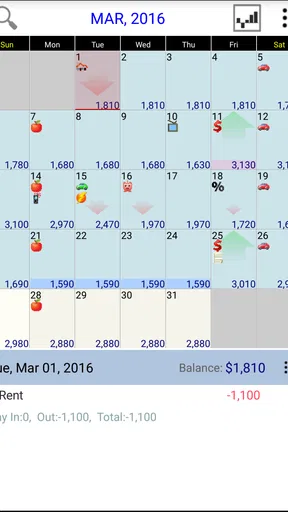
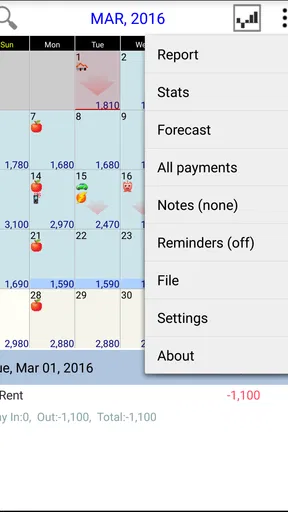
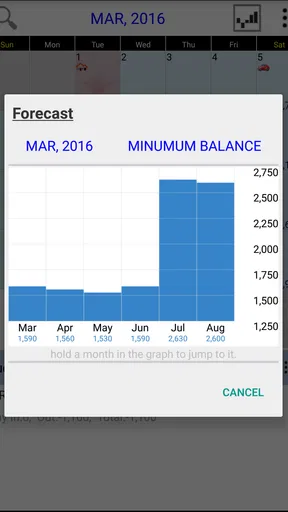
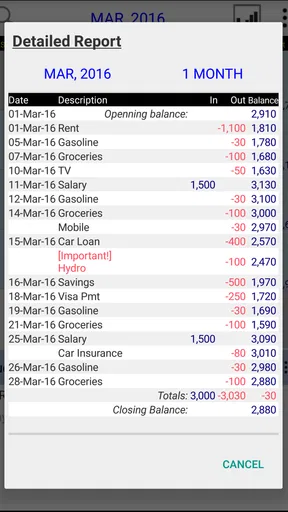
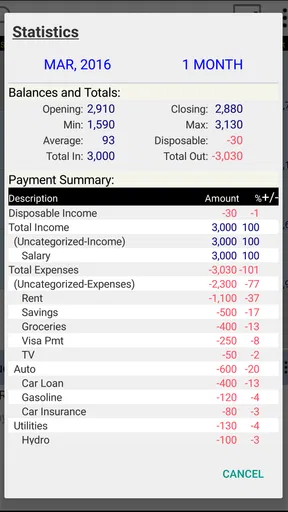
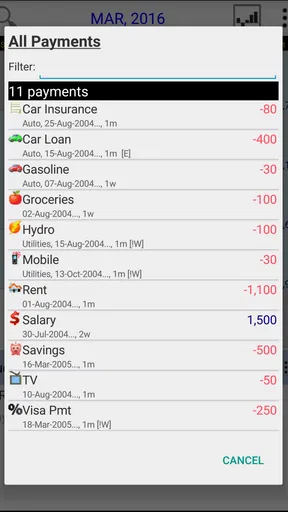
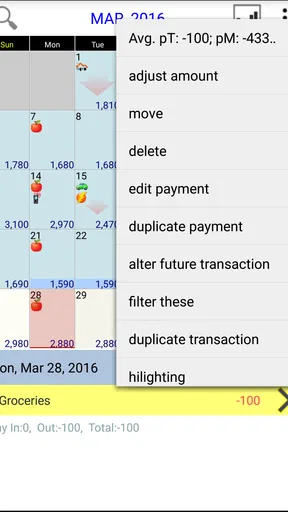
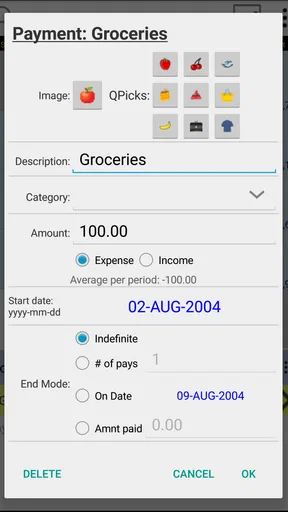
 Analysis by AppCompare
I like budget tools that help me answer a practical question quickly: “Can I afford this before my next income arrives?” Budget Calendar takes that question seriously by placing planning on a calendar instead of hiding everything inside category totals. After spending time with this finance app, I found its main appeal is not flashy automation, but the way it encourages me to look at money as a sequence of upcoming events.
That approach feels especially useful when several bills land close together, when income arrives on different days, or when a normal monthly budget looks healthy but the timing of payments still creates stress. The app is made by MiShell Software Systems, costs $4.95, and is suitable for Everyone. It has earned a 4.8 average from around 481 ratings, with more than 10K installs, which gives it a modest but reassuring user footprint.
Planning money by date instead of by category
The first thing I noticed is that the calendar view changes the way I think about budgeting. In a conventional spreadsheet, I might see rent, food, transport, and subscriptions grouped into columns. That is useful for understanding habits, but it does not always show whether my account will be under pressure on a particular Tuesday. A calendar makes the order of income and expenses much easier to visualize.
I would use it by entering expected money coming in, then placing recurring and one-off payments on their actual dates. The important detail is the relationship between those entries. A bill that looks manageable over a month can still be awkward if it arrives before a paycheck. Conversely, a larger payment may be perfectly comfortable when it follows income closely. This is where the app’s format offers something more practical than a simple expense tracker.
For someone paid monthly, the calendar can act as a forward-looking check before the month begins. For someone paid weekly or irregularly, it can help reveal the gaps between deposits and obligations. I found that this makes the tool less about recording the past and more about preparing for the next few weeks.
A realistic example would be a household with income arriving near the middle of the month, a housing payment at the start, and several smaller automatic charges scattered around the calendar. A category budget may say the household is within its limits. A dated plan shows whether the balance has enough breathing room at each point in the month. That distinction is the strongest reason to choose this app over a basic spending log.
What makes the calendar approach useful
The calendar is most valuable when I treat it as a planning board rather than a diary. I can look ahead and ask which week is crowded, which payment can be moved, and whether a planned purchase belongs before or after an incoming payment. This encourages decisions earlier, when they are still easy to change.
Worth Reading Before You Choose

EA SPORTS FC Mobile 26 Is a Bigger Football Game, but It Takes Time

Flipboard Shows What News Apps Must Do Beyond the Feed

Switching to Android Auto Means Rethinking Your Driving Routine

Google Calendar Makes a Crowded Week Easier to Manage

Ludo King Makes the Most of the Minutes Between Plans

Baby Panda World Brings Quick Play to Modern Phones, but Its Game Library Feels Busy
One useful habit is to review the next several weeks rather than only the current month. That catches awkward transitions, such as a recurring charge arriving immediately after a month with unusually high spending. It also helps when a yearly or occasional expense needs to be anticipated instead of treated as a surprise.
Another practical habit is to separate certainty from expectation in my own planning. A confirmed bill can be entered as a firm commitment, while a possible purchase should be treated more cautiously. The app’s value depends heavily on the quality of the entries I make, so I would avoid filling the calendar with optimistic guesses and then trusting the resulting picture too much.
This is also where the app demands more involvement than fully automated alternatives. I have to maintain the plan and keep dates accurate. That can feel like work, but it also means the budget reflects my decisions rather than an unexplained automatic interpretation.
Who will get the most from it
I think Budget Calendar is a strong fit for people who already know their regular commitments but struggle with timing. It suits users managing rent, utilities, loan payments, subscriptions, school costs, or household expenses that arrive on different days. It can also help anyone trying to build a buffer by seeing how much room remains after known obligations.
It is particularly appealing if I prefer a visual schedule to a spreadsheet. Some people understand financial pressure more clearly when they see a dense run of payments on a date line. For them, a calendar can be less abstract than a list of categories and totals.
The app may also suit a person who wants a focused, paid tool rather than a service built around advertising or a large financial dashboard. Paying once can feel more straightforward than joining a wider ecosystem, although the right choice depends on whether the app’s focused planning style matches the user’s needs.
I would be more hesitant to recommend it to someone who wants automatic transaction importing, investment monitoring, shared household synchronization, or a complete financial account dashboard. Those needs belong to a broader class of money-management products. A calendar planner can complement those tools, but it should not be mistaken for an all-purpose financial hub.
Trust, control, and the moments that deserve care
Because this is a finance app, I judge it differently from a casual utility. The central question is not only whether the calendar is convenient, but also whether I understand what I am entering and what decisions remain under my control. Budget planning often involves sensitive figures, so I prefer a workflow where I deliberately add information instead of feeling pushed into connecting every part of my financial life.
My cautious view is that users should inspect the app’s current permission prompts and any privacy or account screens shown on their own device before entering detailed information. Those visible choices matter more than assumptions based on the app’s category or age. I would also check whether a feature requires an account, whether information can be edited or removed, and what happens when the app is moved to another device.
That is not a reason to avoid the product. It is simply sensible behavior for any tool used to plan personal finances. I would begin with a small, non-sensitive test budget, learn the workflow, and only then decide how much detail I want to maintain there. This gives me a chance to understand the interface without immediately building my entire financial routine around it.
The app was released on May 17, 2013, and its current version is 1.69. It supports devices running Android 7.0 or later. Those details suggest a long-running product rather than a brand-new experiment, but longevity alone does not answer every trust question. I would still read the current on-device prompts and review the available controls after installation, especially if my financial habits or device have changed.
Entering information without losing perspective
The most sensitive moment is not necessarily installation; it is the point where I begin adding real income, balances, and recurring commitments. A calendar can become a compact map of my financial life. That is useful, but it also means I should avoid entering more personal detail than I need for the planning task.
For example, I may only need a clear label such as “insurance” and an amount with a date. I do not necessarily need to place identifying notes in every entry. Keeping descriptions simple reduces clutter and makes the calendar easier to scan. It also limits the amount of sensitive context stored inside individual records.
I would be careful with shared devices as well. Even if the app itself feels private, an unlocked phone can expose a calendar containing income and payment information. A device passcode, sensible notification settings, and avoiding unnecessary notes are basic but worthwhile safeguards.
Before relying on a forecast, I would verify the entries that affect it most: income dates, large fixed payments, and unusual one-time costs. A single wrong date can produce a misleading sense of safety. The app can organize my plan, but it cannot know whether my employer changes a pay date, a bill varies, or an expected payment is delayed unless I update the calendar.
How much agency the workflow gives me
I appreciate budgeting tools more when they make the user responsible for the final decision. Budget Calendar’s calendar-centered idea naturally supports that style. I choose what to record, decide which future events matter, and interpret the resulting schedule. That is different from a system that silently categorizes transactions and presents its judgment as fact.
The trade-off is that manual control requires discipline. If I forget an annual payment, leave an old subscription in place, or fail to adjust an amount, the plan becomes less reliable. I would schedule a short review at the beginning of each month and a quick look whenever my income or fixed expenses change. That small routine is more important than entering hundreds of historical transactions.
A helpful workflow is to start with the commitments that would cause the most trouble if missed. Add housing, utilities, debt payments, transport, and known income first. Then add flexible categories and optional plans. This creates a useful core calendar quickly and prevents the setup process from becoming an exhausting attempt to document every past purchase.
I would also use the calendar to test decisions rather than merely approve them. Before committing to a purchase, place it on the proposed date and look at the surrounding obligations. If the week becomes too tight, move the purchase, reduce its size, or wait for a more comfortable point. That makes the app a decision aid instead of a passive record.
Where it differs from familiar alternatives
Compared with a spreadsheet, this app should feel more immediate for date-based planning. A spreadsheet can be more flexible for formulas, custom reports, and detailed analysis, but it often requires more setup. The calendar format makes the central question visible without building a model from scratch.
Compared with a standard expense tracker, the emphasis is different. Expense trackers are often strongest after money has been spent: they show where it went and help identify patterns. Budget Calendar is more useful before the transaction, when I want to know whether the timing of a planned payment fits the rest of the month.
Compared with a bank-connected finance service, the app’s focused approach may feel calmer and more deliberate. The downside is that I should not expect the same level of automatic account activity, broad financial aggregation, or hands-off updating from a calendar-based planner. If avoiding manual entry is my top priority, another type of tool may be better.
Compared with a shared household platform, this app may be less suitable when several people need simultaneous access to one live plan. A couple can still use a shared budgeting routine around it if the app’s available controls support their needs, but I would not choose it solely for collaboration without checking those controls first.
Small practices that improve the experience
My first tip is to keep the initial calendar intentionally small. Enter the next income event and the most important upcoming payments, then expand gradually. This gives a cleaner picture and helps identify whether the calendar actually changes my decisions.
My second tip is to review timing separately from totals. A month can look affordable overall while one particular week remains uncomfortable. I would inspect crowded stretches before celebrating a favorable monthly result.
My third tip is to create a review trigger around irregular expenses. Whenever I pay something that does not happen every month, I would consider whether it belongs on a future date as a reminder. This is one of the less obvious benefits of a calendar: occasional costs become visible as planning events instead of remaining vague background worries.
My fourth tip is to avoid treating projected money as spendable money too early. If an income entry is uncertain, I would plan conservatively and wait until it is dependable before allowing optional expenses to rely on it. A visual forecast can look precise even when its assumptions are not.
Finally, I would keep the app as a planning layer if I already use another trusted method for records. There is no need to force one tool to do everything. A calendar can handle upcoming timing while a bank statement, receipt folder, or separate tracker handles confirmation and history.
Questions I would settle before committing
Would I pay for it? At $4.95, the decision is relatively simple: the app needs to save me enough confusion to justify a small one-time purchase. If I regularly miss dates or find spreadsheets unnecessarily slow, that can be a reasonable exchange. If I only make a basic monthly plan, a free calendar or spreadsheet may already cover my needs.
Does it suit a beginner? Yes, if the beginner is willing to enter information carefully and think in dates. The concept is easy to understand, but the quality of the result depends on maintaining accurate entries. I would not hand it to someone expecting the app to discover their complete financial picture automatically.
Can it replace online banking? No, and I would not use it that way. It is a budgeting and planning aid, not a substitute for checking actual balances, confirming payments, or managing accounts through a bank. I would always compare the planned calendar with real account activity before making a major decision.
Is it useful for irregular income? It can be, provided I plan conservatively. Irregular earners may benefit from seeing obligations laid out across time, but they should avoid relying on income that is merely hoped for. In that situation, the calendar is best used to protect essential commitments and identify safe spending windows.
Should I choose it over a more automated finance app? I would choose Budget Calendar when visibility, deliberate entry, and payment timing matter more than automatic aggregation. I would choose another option when account synchronization, detailed reporting, investment tools, or multi-user access are essential.
My cautious verdict after using the planner
Budget Calendar has a clear identity: it turns budgeting into a schedule of decisions. I found that more useful than a generic list of expenses when the real problem was not overspending in one category, but having too many commitments arrive too close together.
Its strengths come with a clear responsibility. I have to keep dates and amounts current, interpret forecasts sensibly, and review the app’s visible permission, privacy, and account choices before entering sensitive information. That manual element is not a flaw for everyone; for some users, it is precisely what makes the plan understandable and controllable.
I would recommend it to someone who wants a focused finance tool for upcoming bills, income timing, and everyday cash-flow decisions. I would skip it in favor of a broader service if automatic account data, advanced reporting, or household collaboration is the main requirement. For the right user, though, the calendar view offers a practical change in perspective: instead of asking only where money went, I can see what the next stretch of days is likely to demand.
Pros
- Simple calendar view makes upcoming bills easy to spot.
- Recurring expenses can be planned without entering them each month.
- Helps compare expected income with spending dates.
- Useful for avoiding missed payments and overdraft surprises.
- Clean layout is suitable for users who prefer visual budgeting.
Cons
- May require regular manual updates when amounts or dates change.
- Limited value if your finances depend on multiple currencies.
- Some advanced features may be restricted or unavailable on mobile.
- Initial setup can take time for users with many recurring expenses.
- Not a replacement for bank syncing or detailed financial reports.
FAQs for Budget Calendar
What is Budget Calendar and how does it work?
Budget Calendar is a personal finance app that organizes your income, bills, recurring payments, and everyday expenses on a calendar-style interface. Instead of viewing transactions only as a list, you can see when money is expected to arrive and when payments are scheduled. This makes it easier to anticipate low-balance periods, plan upcoming spending, and understand how your cash flow changes throughout the month.
Can Budget Calendar help me track recurring bills and subscriptions?
Yes. Budget Calendar is particularly useful for recording recurring expenses such as rent, utilities, loan payments, memberships, and streaming subscriptions. Once these entries are added with their frequency and due dates, they can be displayed in future calendar views. This gives you a clearer reminder of upcoming obligations and may help prevent missed payments, although the app itself may not pay bills automatically unless a specific version or integration supports that feature.
Is Budget Calendar suitable for managing a shared household budget?
It can be useful for couples, families, or roommates who want a simple overview of shared income and expenses, but its suitability depends on the collaboration features available in the version you install. Before downloading, check whether it supports account synchronization, shared access, or data export. If it is primarily designed for individual tracking, users may need to enter or review household transactions manually.
Does Budget Calendar connect to my bank account automatically?
Bank connectivity is not guaranteed and may vary by platform, region, subscription plan, or app edition. Some versions of budgeting applications focus on manual entry, while others may offer bank synchronization through supported financial services. Before entering sensitive information, review the app-store description and privacy policy carefully. If automatic imports are unavailable, you can still use Budget Calendar by adding income, bills, and expenses manually.
Is Budget Calendar free to download, and are there in-app purchases?
The download price and available features can differ between the Android and iOS versions. Some Budget Calendar editions may be free with optional premium tools, advertisements, or in-app purchases, while others may require payment from the beginning. Check the current store listing before installing, especially if you need features such as unlimited accounts, advanced reports, synchronization, backups, or ad-free use.


